How to Check Your Laptop Battery Health in Windows 11
Windows 11 has a free, built-in way to check laptop battery health: the battery report. One command creates a page that shows how much charge your battery can hold today compared with when it was new.
Tested on Windows 11 25H2 · Lenovo ThinkPad T14s Gen 6
Quick fix
- Right-click the Start button and select Terminal.
- Type
powercfg /batteryreportand press Enter. - Open the battery-report.html file it saved, and compare Design capacity with Full charge capacity.
In this guide
Step 1: Create the battery report
- Right-click the Start button and select Terminal.
- Type the command below and press Enter:
powercfg /batteryreportWindows replies with “Battery life report saved to file path”, followed by where it saved the file. In a normal Terminal window that is usually your user folder, for example C:\Users\YourLoginName\battery-report.html.
To save the report straight to your Desktop instead, use:
powercfg /batteryreport /output "$env:USERPROFILE\Desktop\battery-report.html"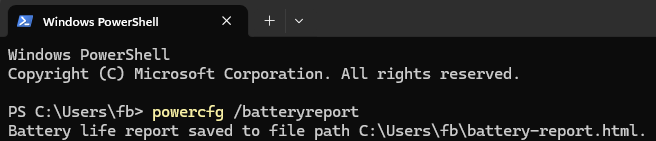
Step 2: Open the report
Open File Explorer, go to the folder shown in Terminal, and double-click battery-report.html. It opens in your web browser. You can also type start battery-report.html in the same Terminal window.
Step 3: Read your battery health
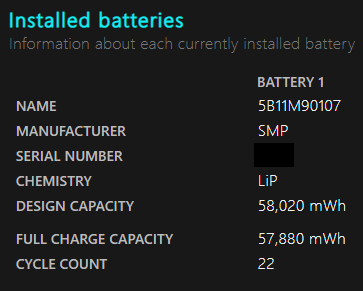
Scroll to Installed batteries. Three lines matter:
- Design capacity: how much energy the battery held when it was new, in mWh.
- Full charge capacity: how much it holds now when fully charged.
- Cycle count: how many charge cycles it has been through. Some batteries don’t report this, so it can show as blank or 0.
To work out battery health as a percentage, divide full charge capacity by design capacity and multiply by 100. For example, a battery designed for 50,000 mWh that now fully charges to 40,000 mWh is at 80%.
Further down, Battery capacity history shows how full charge capacity has dropped over time, and Battery life estimates compares how long the battery lasts now with when it was new.
What is a good battery health percentage?
There’s no single official cut-off for home users, but Microsoft’s own battery reporting for businesses (in Intune) is a useful guide: batteries holding below 60% of their design capacity are treated as most impacted, and those at 60–80% as moderately impacted. Above 80%, most people won’t notice much difference day to day.
All laptop batteries wear down with use. What matters is whether the battery still lasts long enough for how you use your laptop.
Other ways to check laptop battery health
Many laptop makers also show battery health in their own apps, such as Dell’s support and power tools, Lenovo Vantage, HP Support Assistant and MyASUS. They read the same information from the battery, often with a simple good/fair/poor rating.
When to replace the battery
- Battery health is well below 80% and the laptop no longer lasts long enough for you.
- The laptop shuts down suddenly even when the battery shows charge left.
- Stop using the laptop and get the battery replaced if you see swelling: a lifting trackpad or keyboard, a bulging base, or gaps opening in the case.
Questions people ask
Does Windows 11 show battery health in Settings?
Settings › System › Power & battery shows battery usage by app, but the battery report is the built-in way to see design capacity against full charge capacity.
Do I need to run Terminal as administrator?
Normally no. If Windows can’t save the report, use the /output command to save it to your Desktop, or open Terminal (Admin) and run the command again.
Why does my battery report show a cycle count of 0 or blank?
Not every battery reports a cycle count. Windows shows zero when the battery doesn’t support a cycle counter.
Does the battery report work on a desktop PC?
Only on devices with a battery. On a desktop without one, the report has no battery information to show.
Related fixes
- How to clear the Teams cache in Windows 11
- Windows 11 running slow? 10 tested ways to speed it up
- Outlook keeps asking for password? 7 fixes that work
Sources: Powercfg command-line options, Battery health report (Intune) and BATTERY_INFORMATION structure, all on Microsoft Learn.